Lessons from building an AI-assisted Unreal Engine tool


- The Unreal plugin evolved from a weekend prototype into a production tool that has saved hours of repetitive manual work over three months of active use.
- AI delivered the biggest productivity gains on structured development tasks such as tooling, automation and editor workflows.
- Well-documented Unreal Engine patterns were easy for AI to generate, while project-specific context and long-term code consistency remained challenging.
Olga Taranova is an online tech lead at Thrylox.
A few months ago, I needed to move data between CSV files and Unreal assets again for a game project I’m currently working on at Thrylox. It is the kind of tedious but necessary work every Unreal project eventually accumulates.
Designers want to edit numbers in a spreadsheet. The engine wants them as DataAssets. Somebody has to build the bridge between the two.
Without automation, this kind of work always looks the same: endless design iterations, constant manual editing, and plenty of opportunities to make mistakes. The usual solution is to write a script or a small internal tool to handle it. And I had done that before, but this time I wanted to see what an AI-assisted approach would actually look like in practice.
After a few iterations, the result turned into a fully usable internal plugin. I’ve been using it for around three months now inside an active game project.
The task itself was straightforward - clear input, clear output, and a simple way to verify whether the result worked. That made it feel like exactly the kind of problem Claude could help with.
After a few iterations, the result turned into a fully usable internal plugin. I’ve been using it for around three months now inside an active game project. The plugin is public, but still in development.
It has already become one of those small internal tools that quietly save hours of repetitive work. What interested me was not whether Claude could generate working code, but where AI-assisted development genuinely saved time, and where it still struggled.
What the plugin does
The plugin exports Unreal Engine 5 DataAsset properties to CSV files and imports them back using UPROPERTY metadata. The entire CSV structure is declared directly in C++ through metadata tags attached to UPROPERTY and UCLASS definitions.
Designers can edit data in spreadsheets, while Unreal assets stay synchronised with predictable type-aware imports and exports.
The system supports several features that make it practical in production:
-
Metadata-driven mapping, where tags such as CsvExport, CsvColumn, CsvRows, CsvId and CsvExpand define how assets map to spreadsheet columns and rows.
-
Multi-row table mode, where a single DataAsset containing a TArray can represent an entire CSV sheet, with rows matched through stable IDs rather than row order.
-
Nested struct and soft-pointer expansion, allowing complex properties to flatten into readable spreadsheet columns instead of opaque serialised blobs.
The plugin is roughly 4,000 lines of C++ with a small Slate-based editor UI for importing, exporting, and validating CSV data directly inside Unreal Engine.
The project evolved in iterations rather than in a straight line. The initial version consisted of basic single-asset import/export, a simple CSV parser, and the editor UI, and came together over a weekend.
In practice, the plugin ended up becoming an ongoing internal tooling project rather than a one-off script.
After that, the tool gradually expanded as new requirements appeared. Features were added incrementally, bugs got fixed, and earlier implementation decisions were repeatedly revisited as the workflow became more complex.
In practice, the plugin ended up becoming an ongoing internal tooling project rather than a one-off script. Over the following months, the total time spent extending and maintaining it amounted to roughly three person-days per month while it was actively used in the game project.
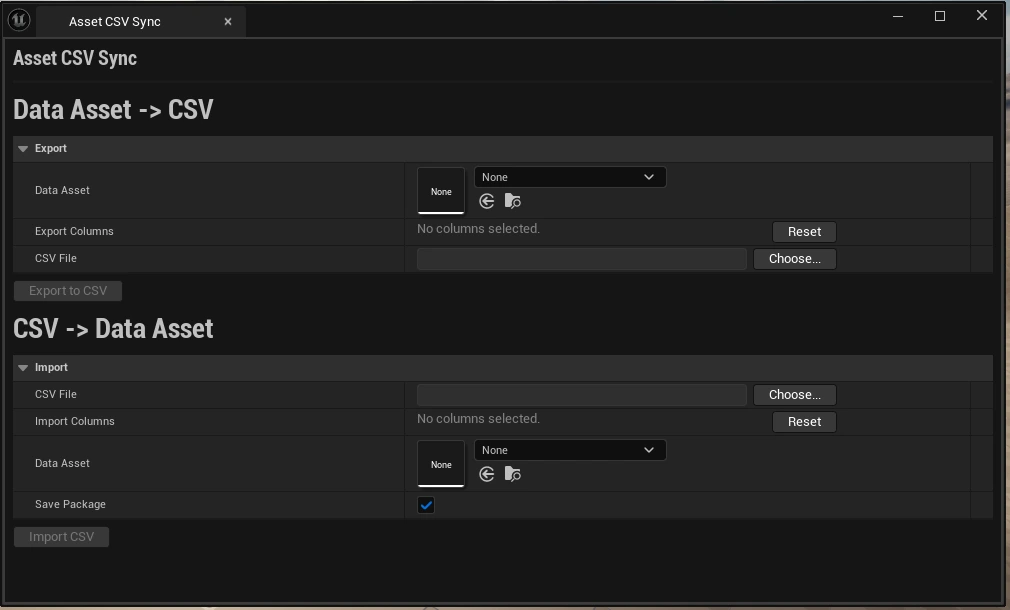
There is an example of usage:
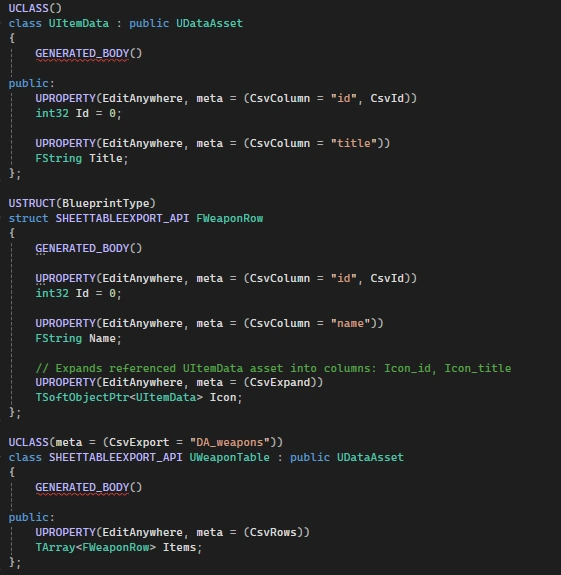
The plugin uses reflection to discover how DataAssets should serialise into spreadsheet columns.
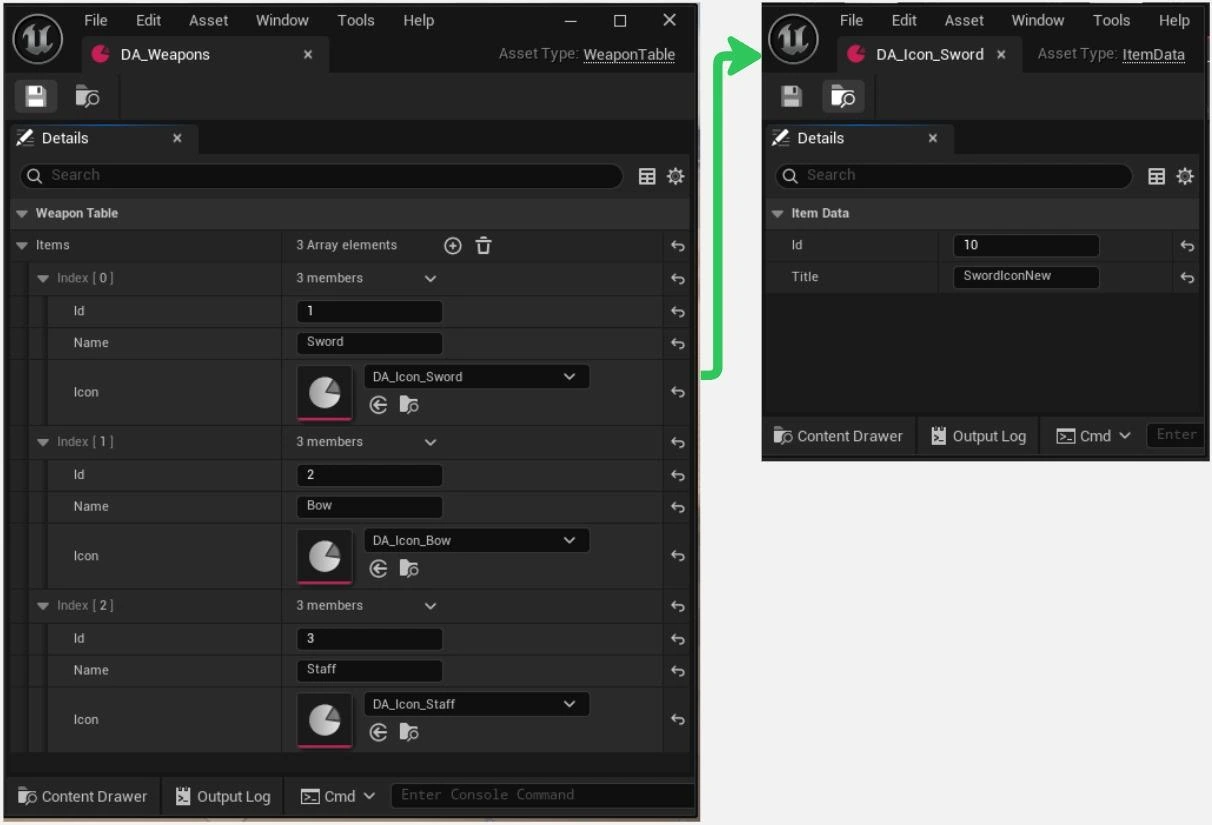
The plugin exports DA_Weapons DataAsset into a CSV file, producing a table with columns such as id, name, Icon_id, and Icon_title that can be opened and edited in spreadsheet tools.
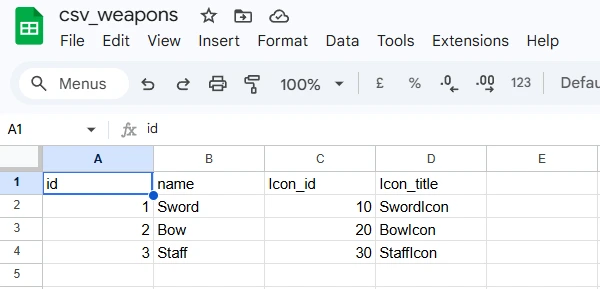
After modifying spreadsheet values externally, the plugin reimports the updated CSV. The imported data is then propagated into referenced Unreal assets through the metadata-driven import pipeline, updating the corresponding DataAssets with the new values.
What Claude did well, and where it broke
The parts Claude handled most reliably were usually the ones where Unreal already had clear conventions, plenty of public examples, and documentation available.
Boilerplate Unreal patterns worked especially well. Things like UCLASS and UPROPERTY macros, plugin descriptor setup, editor tab registration, and module lifecycle hooks (StartupModule() / ShutdownModule()) follow highly repetitive structures across Unreal projects.
Claude consistently generated correct implementations on the first attempt because these patterns appear almost identically throughout Epic’s documentation.
Claude consistently generated correct implementations on the first attempt because these patterns appear almost identically throughout Epic’s documentation, sample projects, and public repositories.
The Slate UI layer was another surprisingly smooth area. The plugin’s editor panel used standard Unreal editor infrastructure: widget hierarchies, detail panel customisations written with IDetailCustomization, and validation states that disable buttons when required fields are missing.
Slate itself is verbose and requires a lot of boilerplate code. But because the entire interface is implemented directly in C++, recurring UI patterns become very easy to recognise and use, which turned out to work surprisingly well with Claude.
Reflection-based property traversal also proved a good fit for AI-assisted generation. A large part of the plugin relies on iterating over Unreal reflection data using tools like TFieldIterator, reading metadata tags, and handling specific property types such as FStructProperty, FArrayProperty, and FSoftObjectProperty.
Unreal’s reflection system exposes the data structure very explicitly through property types and metadata, making it much easier for Claude to infer how the code was expected to behave.
Throughout the project, Claude performed best when solving problems whose solutions were already well known within the Unreal ecosystem.
Throughout the project, Claude performed best when solving problems whose solutions were already well known within the Unreal ecosystem through documentation pages, forum posts, Stack Overflow answers, engine source code, or Epic’s samples. In those situations, Claude often produced good results by combining existing solutions.
The failures were also fairly consistent. Claude struggled whenever the correct solution depended on editor behaviour, engine quirks, or project-specific context that was not clearly represented in public examples.
One example was Unreal’s editor transaction system.
Early import implementations modified DataAsset properties directly without wrapping changes in an FScopedTransaction.

Technically, the import worked, values updated correctly, but the editor’s undo system was completely bypassed. In practice, that meant interrupted imports could leave assets partially modified with no clean recovery path. Claude generated functional import code, but it omitted some editor integration details that Unreal developers typically handle.
Another issue came from Unreal’s serialisation defaults. The initial export implementation relied on Unreal's standard ExportTextItem function, which serialises property values to text, but silently skips properties whose values match the class default object.
The hardest issues appeared once the plugin began supporting more complicated property structures.
On paper, this behaviour makes sense. In a spreadsheet pipeline, this became a serious problem: unchanged values simply disappeared from the exported CSVs.
Nothing crashed, nothing threw an error, but the generated data became incomplete. Fixing it required overriding the engine’s default export behaviour rather than relying on the built-in implementation.
The hardest issues appeared once the plugin began supporting more complicated property structures. Features like CsvExpand, which flattened nested structs, arrays, and soft object references into spreadsheet columns, began causing frequent regressions.
A fix for struct traversal would accidentally break array handling. Changes to soft references handling would alter behaviour for plain structs. The individual systems worked in isolation, but interactions between them became increasingly fragile as the plugin became more complex.
In practice, testing mattered far more than code generation itself for keeping the project stable.
Overall, Claude was good at generating isolated functionality, but much weaker at maintaining consistent system behaviour across a growing system.
Round-trip tests, in which CSV data was exported, modified, reimported, and exported again for comparison, became the primary safety net for catching regressions before they spread further.
Unit tests and detailed Output Log diagnostics helped isolate which traversal layer or property handler had broken without manually stepping through the entire pipeline every time.
Overall, Claude was good at generating isolated functionality, but much weaker at maintaining consistent system behaviour across a growing system.
The difficult part was not generating individual pieces of functionality, but making changes without breaking behaviour somewhere else in the pipeline.
Why this worked: what LLMs need, and what tools provide
LLMs tend to work best when the task is clearly defined, the necessary context is available, and the result is easy to verify. None of those conditions is unusual. Those are the same conditions that make a problem easy for a human collaborator unfamiliar with the codebase: explain the goal, show them where to look, and make it obvious how to verify that the implementation works.
Tooling work provides the kind of conditions where working with AI becomes much more effective.
A tool like the CSV-to-DataAsset plugin satisfies all three. The spreadsheet format and Unreal asset structure are clearly defined, the conversion rules between them are explicit, and round-trip diffs make failures easy to detect. Almost everything Claude needed to know was either in Unreal's public documentation or in the mapping schemas I pasted into the prompt.
The important part is that tools are not a special case of AI assistance. Tooling work provides the kind of conditions where working with AI becomes much more effective.
Why is gameplay code a different story
Gameplay code in an indie team rarely meets those conditions.
The features change weekly. The design document, if it exists at all, rarely matches the current state of the game. A lot of gameplay code looks the way it does because of a conversation that happened in Slack three months ago and was never written down.
A lot of gameplay code looks the way it does because of a conversation that happened in Slack three months ago and was never written down.
Much of the context behind those decisions still lives in the people who made them, and on a small team, that person is usually still on the team and still answers in person.
For a human teammate, this is fine. They ask. They get an answer. They move on. Claude does not have access to that kind of context unless somebody explicitly writes it down.
You can paste files into the prompt, but not the full history behind why the system ended up this way, including old bugs, failed approaches, platform-specific edge cases, and months of undocumented decisions.

Better models will likely improve parts of this workflow, but they do not change the underlying problem. Gameplay systems in indie projects often depend on context that never fully exists in code or documentation.
Indie teams usually move too quickly for that kind of knowledge to become fully formalised. The same pressure that makes AI-assisted development appealing also pushes teams toward fast iteration, informal decisions, and accumulated team knowledge.
As a result, AI tends to work best in parts of development where workflows, constraints, and expected results are already clearly defined.
The same pattern appears in other tools
After building the plugin, I realised that many other internal tools I had built or wanted to build followed very similar workflows.
One example was server configuration sync tooling. In our project, gameplay balance and configuration data are stored on the server as JSON, while designers work with DataAssets in the Unreal Editor. Keeping the two in sync means converting between formats, applying updates to existing assets, and ensuring nothing is lost in translation.
It turned out to be very similar to the CSV plugin problem. The inputs and outputs were well-defined, the conversion process was straightforward, and it was easy to verify the result with round-trip diffs.
Gameplay code is usually far more dependent on evolving design decisions and project-specific context. Tooling work tends to be much more predictable.
Asset validators worked in much the same way. These tools scan DataAssets and flag issues such as missing references, empty required fields, or naming-convention violations. The validation logic itself is usually simple. What takes time is writing all the repetitive traversal, reporting, and editor integration code around it.
Claude handled that kind of work well because validator tools are relatively easy to test. Unit tests quickly show whether the validator catches the expected invalid assets and ignores the valid ones.
What these tools had in common was that the work was relatively structured. The inputs and expected outputs were clear, problems were easy to detect, and the code depended far less on gameplay context or project-specific knowledge.
Gameplay code is usually far more dependent on evolving design decisions and project-specific context. Tooling work tends to be much more predictable.
Where this leaves us
The most useful lesson from the project was that AI assistance worked much better for some types of development work than others.
The real question is which parts of development actually benefit from it.
Most of the gameplay and production code still required traditional development work. The requirements changed too often, and too much project context lived outside the prompt.
Tooling, automation, and editor workflows were generally a better fit. That was where AI-assisted development began to save a noticeable amount of time.
Companies

People